GST compliance
GST work from your books, ahead of the due date
GSTR-1, GSTR-3B, 2B matching, IMS, e-invoices and e-way bills.

- Returns from the books
- e-Invoices on time
- e-Way bills for every movement
GST returns, prepared and checked
- A due-date calendar and a compliance score for each company
- A GSTIN check on any party
- Returns are filed from the web portal; the app shows the same screens
Read more
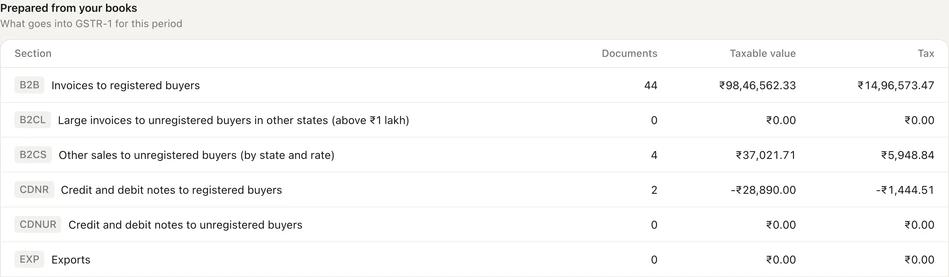
Connect your GST portal account with the OTP it sends, and Auditer prepares GSTR-1 and GSTR-3B from your books and shows them beside what the portal already holds. Purchases are matched with GSTR-2B, listing suppliers who have not filed and the input tax credit at risk in rupees, and IMS lists every supplier invoice, which you can accept, reject or keep pending if the Owner allows it. Deposits in your electronic cash ledger can be posted to TallyPrime as payment vouchers, and notices from the department appear alongside. The Owner chooses whether Auditer only prepares returns, saves drafts on the portal, or files them with an electronic verification code (EVC).
e-Invoices without the 30-day worry
- An alert with the portal's reason when an invoice cannot be registered
- Fix a party's GSTIN or an item's HSN code, and Auditer writes it into Tally
- Correct an invoice dated today, and the same Tally voucher is updated
Read more
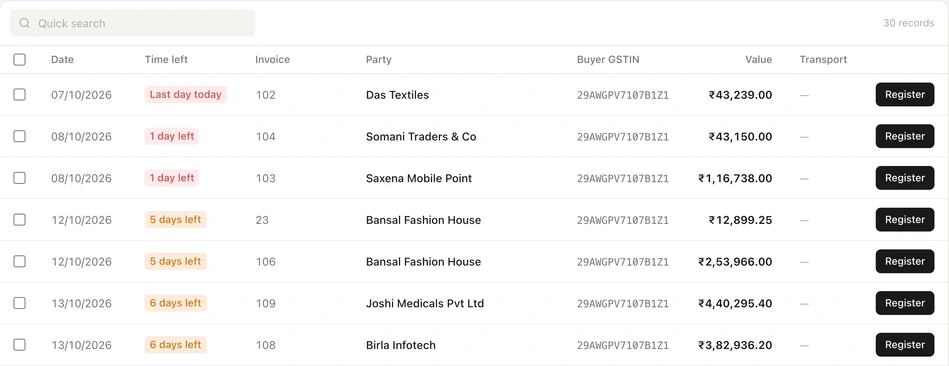
Answer a few questions once for each company: whether turnover crossed ₹5 crore in any year since 2017-18, whether it is ₹10 crore or more, where e-invoices are generated, and whether they are registered manually or automatically. If you generate them in TallyPrime, Auditer shows the result and charges nothing. If Auditer generates them, Auto mode registers each new invoice right after it syncs, sales to consumers are left out, and the IRN (Invoice Reference Number) and signed QR code are printed on the invoice and written back into the TallyPrime voucher. When the 30-day rule applies, each waiting invoice shows its days left, with alerts at 10, 5, 2 and 0 days.
e-Way bills for every movement of goods
- An alert about 8 hours before a bill expires
- Distance worked out from the two PIN codes when you leave it blank
- On an e-invoiced company, the IRN comes first
Read more
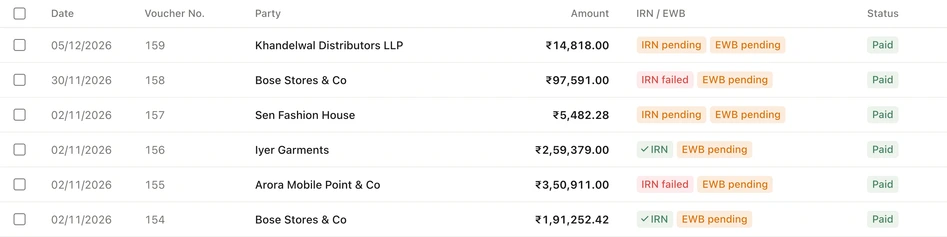
Auditer tracks sales, delivery notes for job work, line sales, exhibitions and own use, purchase returns, purchases from unregistered sellers, exports and, if you opt in, stock transfers between godowns. It knows each state's limit for movement within the state, such as ₹1 lakh in Delhi and Maharashtra, and lets you override it. From a generated bill you can complete Part B with the vehicle or transporter, change it, extend, consolidate or cancel, and a check against Vahan, the national vehicle register, confirms the vehicle number. e-Way bills that others raise on your GSTIN are fetched twice a day, with the time by which you can reject each one.
How to set up GST in Auditer
- 1Turn on what you need
- 2Connect the portals
- 3Choose how far Auditer goes
- 4Work from the lists
Read more
- 1. Turn on what you need. On the web portal, turn on GST returns, e-invoice or e-way bill for each company: 100 credits each, once.
- 2. Connect the portals. Connect the GST portal with your username and its OTP, for up to 30 days at a time, and enter your own e-invoice and e-way bill API user.
- 3. Choose how far Auditer goes. Prepare only, save drafts or file with EVC; view IMS or decide in Auditer; Manual or Auto for e-invoices and e-way bills.
- 4. Work from the lists. Check what is ready, what needs attention and what is due. Alerts arrive before each deadline.
What it costs
Estimate your costRead more
Each e-invoice and e-way bill Auditer generates costs 2 credits, returned if the portal refuses it. Turning on GST returns, e-invoice or e-way bill costs 100 credits per feature for each company, once. e-Invoices and e-way bills generated in TallyPrime are shown at no charge, and a GST deposit posted to TallyPrime costs 0.10 credit, like any entry.
- e-Invoice or e-way bill generated by Auditer
- 2 credits
- Turning on a feature, per company
- 100 credits once
- e-Invoices and e-way bills made in TallyPrime
- Free
Frequently asked questions
GST compliance in Auditer covers GST returns, GSTR-2B matching, the Invoice Management System (IMS), e-invoices and e-way bills, all worked from the books you keep in TallyPrime. It helps owners, accountants and CAs file on time and protect input tax credit, while the Owner decides whether Auditer only prepares, saves drafts or files. Each e-invoice or e-way bill costs 2 credits, returned if the portal refuses it, and each feature costs 100 credits once per company to turn on.
Can Auditer file GSTR-1 and GSTR-3B?
Yes, if the Owner chooses filing for that company. The Owner picks one of three modes: prepare only, save drafts on the GST portal, or file from the web portal with the EVC sent to the authorised signatory.
How does Auditer match purchases with GSTR-2B?
Auditer compares GSTR-2B from the GST portal with the purchase vouchers synced from TallyPrime and lists suppliers who have not filed, with the input tax credit at risk in rupees. A Remind button emails each supplier the details.
Does the 30-day e-invoice rule apply to my business?
Only if your aggregate turnover is ₹10 crore or more. Auditer applies the 30-day count when the Owner confirms this in Settings, then shows the days left on each invoice still waiting for an IRN.
Do I need my own e-invoice and e-way bill API access?
Yes. Create an API user through Auditer's GST Suvidha Provider (GSP) on the e-invoice and e-way bill portals, then enter it in Settings. Passwords are stored encrypted with AES-256-GCM.
Does Auditer prepare GSTR-9 or amend filed returns?
No. Auditer does not prepare the annual return (GSTR-9 or GSTR-9C) or amendments to filed returns, so do those on the GST portal or with your tax professional.
Related features
Bring your Tally books with you
Install the Agent, connect TallyPrime and see your business on any screen in minutes. Start with 10 free credits.
10 free credits. No card needed.